
Brandle has an email/workflow solution that allows you to communicate with anyone you need to regarding a specific POP. This includes communicating with team members that are also users of the Brandle system, as well as people who are not users of the Brandle system. These other people may be the account holders of third-party properties such as partners, employee advocates, or licensed employees utilizing their own digital accounts.
The benefit of having these people in Brandle is to make communication streamlined and to keep an historical record of governance about the digital assets associating with your brands.
Adding Contacts to your Contacts tab can be accomplished in three ways:
- Inviting a new Team Member to the company Brandle Account. This automatically places them into the Contacts/People table.
- Adding a Contact one at a time by selecting the Add Contact button in the People table of the Contacts Tab.
- Asking your Brandle Ambassador to upload a Contact spreadsheet for you.
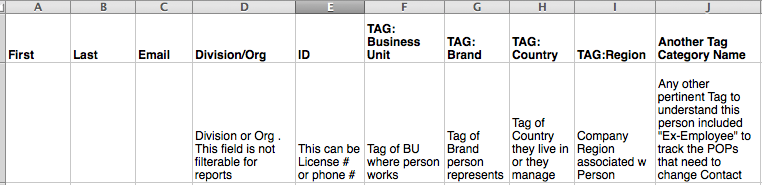
The information that is tracked in the People table is:
- First Name
- Last Name
- ID (Either a phone number or license number)
- Tags (about the People, not POPs)
There is another field in the table called Roles. This field is populated when the contact is associating with a POP on the Inventory table.
Creating the spreadsheet to be uploaded is much like creating the POPs spreadsheet. The items above and the Tag categories should be the header column with the specific data in the cells. It should look something like this:
Comments
0 comments
Please sign in to leave a comment.