
The first step of getting started with the Brandle Presence Manager is to input the principle domain name for your enterprise. This is done automatically when your account is created at Brandle, Inc. and is not a task you need to manage.
At this time, the Brandle Presence Manager will initiate the Discovery process and begin learning about your enterprise. As Discovery progresses, the system will build a profile of your enterprise that includes a collection of "identities" which represent various aspects of your organization (e.g. company, brands, products, divisions, people, etc).
During the Discovery process, the system will discover domain names which it can determine are registered to your organization. These will be placed automatically into your Inventory.
Brandle will also begin to discover social media and other domains (i.e. points-of-presence or POPs) which require someone from your company to confirm their relationship to your enterprise before they get moved to your Inventory. These can be found under the Discovery tab.
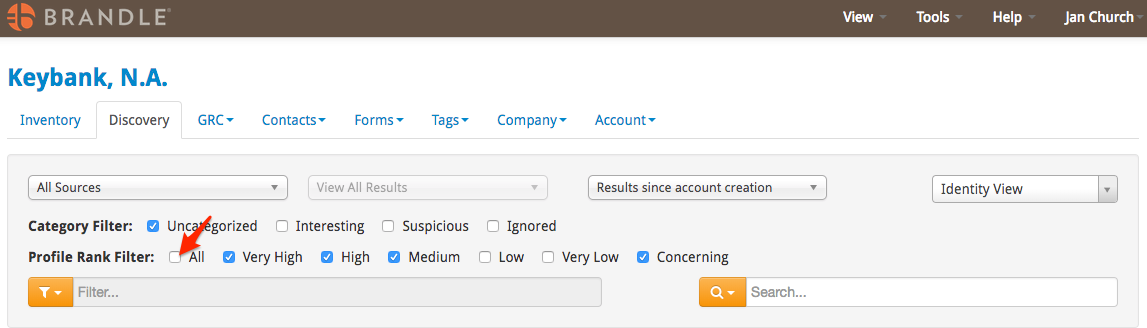
The Brandle Presence Manager will likely examine thousands of candidate domain names and social media sites (i.e. points-of-presence) during the course of Discovery. Each candidate POP will be graded on how closely it matches the corporate profile we built during Discovery using our ProfileRank algorithm. The ProfileRank grade runs from "Very Low", "Low", "Medium", "High" and "Very High" plus "Concerning". By default, the results are automatically filtered to exclude the Low and Very Low ProfileRank grades and sorted to put those POPs graded a Very High first.
To view all of the POPs in your Discovery, no matter the ProfileRank grade, click the box in front of All on the Profile Rank Filter. Brandle resets to the Very High, High, Medium and Concerning filter each time you log in, so be sure to click All, if you wish to review everything together. Or you can click a filter at a time to process your Discovery.
Comments
0 comments
Please sign in to leave a comment.