
The focus of our recommended steps is to help you (the Administrator) understand how Brandle works and to assist you in developing your best strategy to achieve the corporate goals you've set for your digital governance program. We begin with a quick look at your brand initial Discovery (because everyone wants to see what Brandle has found). We then move into creating your Tag Strategy which drives your workflow, training and reporting. Followed by your global team strategy. We will also touch on key aspects of setting up the Brand Patrol and GRC modules (only needed if your company has licensed these modules).
What is a POP or POPs? Throughout the Brandle Help Center, FAQ and Training, we use the term POP for Point-of-Presence. This is our general and all-encompassing term for an account, page, domain, website, board, etc. The plural is POPs for Points-of-Presence. It is an easy way to refer to any item, group of items, or your entire list of what is in a table. The Discovery, Inventory and GRC tabs all have tables of POPs.
Here are our recommended steps:
1. Discovery (First Step)
Discovery is automatically initiated at your account creation, based on your domain name and other domains Brandle finds associated with your corporate registrant information. As a first step, many people want to “play” with the POPs that come into Discovery as it is very exciting to see what Brandle has discovered about your company and brands. You may want to move some POPs (points-of-presence) to Corporate Inventory or Employee Inventory, but only play with a few POPs so you can get a feel for the process of categorization. At this time, you may also want to review the websites and domains that Brandle discovered and placed in your Inventory.
Before going too far with your categorization process, it is important to create your Brandle strategy and workflow goals, design your Tag strategy to support your Brandle strategy, and make an initial plan on how you will roll-out Brandle responsibilities and training to different team users. of how you want your Brandle system to look and work.
2. General Brandle Strategy
We strongly recommend you take the time to consider how you will work with Brandle, what you want Brandle to monitor, how you want other stakeholders to help you with Brandle management, how you want to communicate with POP managers, how you want to search and report on data within Brandle, and other goals you may have in mind.

Look at each feature tab in Brandle (Inventory, Discovery,GRC (if licensed), Contacts, Forms, Tags, Company, and Account) and begin to understand what features and possibilities are available to you in each tab. Knowing how you may want to work with information in each tab that suits your company workflow, will be time well-spent! Be sure to look at the Menu items in the Brandle Bar (View, Tools, Help, and your own Account) to know what is available within these areas. If you need an explanation of a Tab or feature, first look in the Help menu and access the Help Center.
Also consider who will need to work in Brandle as an Administrator, an Entity User (where you can set individual Permissions and Scope), a View Only user, or if you need to create specific Roles that will have the same Permissions attached for anyone with that role. Consider the actions you would like them to take. Will they be able to move POPs from Discovery into Inventory? Will they be able to create or apply Tags? Have these thoughts in mind while you learn about Brandle and consider your Brandle Strategy.
3. Consider Your Inventory Categories
Brandle segments your POPs by social network or website automatically. Brandle also comes with seven different "buckets" to place your POPs into Inventory: two for corporate property, 4 for third-party property, and 1 for infringing or fraudulent property. You can title these buckets whatever you wish, but it is important to remember to keep the Corporate property truly corporate-owned POPs and Infringing as some title for POPs with true concerns as these categories have special "rules" around them. However, knowing which third-party properties you wish to monitor is an important step so you know to create a title for that category that works for you and so you don;t mix in other POPs into that category. This is not critical at the early stages of on-boarding, but it is a good item to understand long-term. Some examples could be:
- Employees — such as the employees who have been trained as an official employee ambassador and should be monitored.
- Regulated Employees — such as Mortgage Loan officers, or Financial advisors.
- VIP Employees — such as executives that use their own social accounts but are very active...and therefore should be monitored to also catch fraudulent accounts.
- Channel Partners or Certified Professionals who use your brand
- Sponsored Items — such as Teams, Arenas, events that use your brand
- Communities — fans of your products, communities using your products
- Product or Brand Ambassadors — especially if you need to monitor how they represent their paid status
4. Consider Your Tag Strategy
Developing your tag strategy is an important process as it will help you create the strongest reports to govern, manage, and measure your social footprint (and all those people who associate with your company and brands). It’s worth the time to consider what reports and processes you will need monthly, quarterly, or as a matter of process (such as creating a report on all of the POPs that need to be merged into a Facebook Global Pages account).
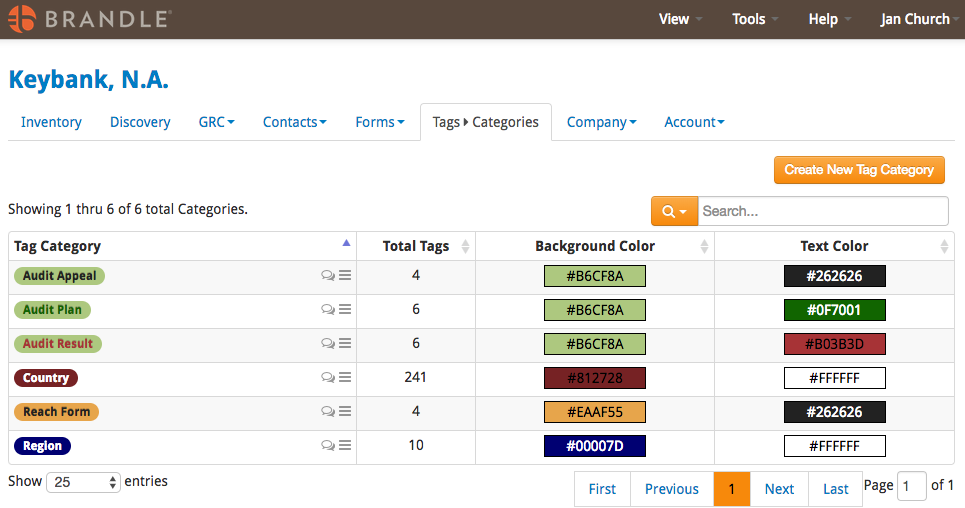
Brandle offers a pre-set offering of standard Tag Categories and Tags. Below is an image of the categories. You can see that we have populated the location categories with standard regions and the countries. these are common tags that most global clients utilize. However, it is worth the time to delete the countries where your company does not do business and to ensure the Region Tags are the same as your corporate region titles (and change them to what works for your company.
The Audit Categories contain standard process Tags such as Merge, or Has been Merged, or Un-publish or Delete. See if these work for you or if you would like to alter them. As these tags are process work once you are trained on Brandle, you can postpone this decision until later.
Other common Tag categories are Brand and Business Unit for POPs. For Contacts, you may want different tags such as Office Location.
5. Import POP and Contact spreadsheets
We discover a lot, but you most likely already have a spreadsheet of known POPs and some of the people that manage these POPs. We will work with you on formatting your spreadsheet to pull in the POPs all with appropriate Tags. You may not have your complete Tag strategy built, but you do know the fundamental strategy you want to apply (such as Brand, Business Unit, Country, Region, etc.). Talk to us about how Tags work between POPs and Contacts and we will guide you on the best Tag strategy to eliminate any duplication between the POPs and the Contacts spreadsheets (this is especially true if you have licensed the GRC module).
When we upload your POPs spreadsheet, should Brandle see matches within Discovery, then Brandle will move them automatically into your Inventory because the upload indicates you have already confirmed them as corporate property. If you want to do this, let your Brandle account manager know and we will work with you on the format of the spreadsheet. However, it is not necessary to have tags or contacts to import a spreadsheet of URLs, , but it does speed up the on-boarding process nicely.
6. Set up Brand Patrol
If you have licensed the Brand Patrol module, add in your Brands to force a scheduled search on specific brands. You can find this in Company/Identities Tab and select the Add new Brand button. Be sure to stay within your licensed volume of brands. We will cover the naming strategy in our initial kick-off meeting (such as not placing common terms into Patrol so you don't receive an overload of generic accounts).
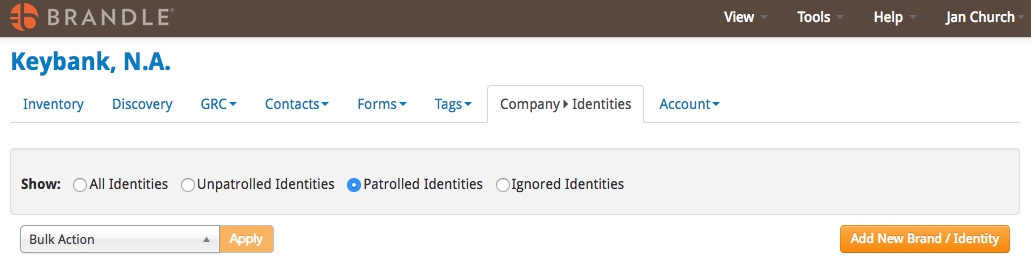 This will force a weekly scheduled search. So anything that has been newly created since we did your initial discovery will come into Brandle once the first Patrol occurs. Then weekly, if Brandle finds something new for a brand, it will send you an email alert. If you would like us to upload a spreadsheet of brands instead of you hand adding each one, we are happy to do so.
7. Add Contacts
On the People tab, just add Contacts. Include emails and any Tags you wish. If it is not a priority for you to add contacts from the Discovery tab while you are processing a POP, you can do this later. We can also upload contacts (with tags) if you have a spreadsheet (as stated above). Remember that people in your Contacts list (such as a group of employees or partners) do not need to be invited as a Brandle user in order for you to communicate with them about the POPs they manage. The email process within Brandle will help you with this workflow and keep track of the communication trail.
8. Review, work, and categorize POPs from Discovery
With all the above already set-up, now you can work within the Discovery tab and apply all the information to a POP that you need. You can also write comments on the Note Icon on a POP. When ready, place a POP into an Inventory Category, as Infringing, Ignore it, or place in the holding area of Interesting or Suspicious.
9. GRC Issues/Criteria
If you have licensed the GRC module, setting up your Criteria and Issues and beginning communication with your target audience (such as employees in regulated industries) is an important step. Take time and allow us to help you with best practices when defining your Brandle Compliance process.
10. Invite Team Members
When you are ready to bring your POP managers into Brandle, you will want to set-up your Account Team and allow them to be an Admin, an Entity User (with custom permissions and scope per user), a View-only user, or a defined Role set-up by you. It is important to create a strategy document of team members, their user role, and their responsibilities before inviting them. But only do this when you are ready to have them accept the invitation and have access to Brandle and you have communicated your Brandle strategy and plan. Be ready to guide them with their first steps to take in the Brandle Presence Manager. Now is a good time to plan if you would like them to help you categorize your Discovery, or tag their POPs with the Tag/Tag Category system you've designed.
11. Reach Campaigns and Forms
Depending on your goals and risk priorities, you may need to reach out to people to collect their websites and social presence so you can monitor their digital footprint that uses your brand. This would be the case for a regulated company with regulated employees, or if you want to collect the social accounts of your approved Employee Brand Ambassadors. We will help you set-up and send you first Campaign.
A form is also a great tool for the Corporate Governance team to utilize across the globe as part of your new social account on-boarding process. By creating a form, you will be able to place a link on the company network and any team member can complete and submit a new POP with Tags and Notes) into Brandle. Should you need a digital form for your social team members to complete after a governance review that they may open
We hope you enjoy using the Brandle Presence Manager to gain better control of your digital brand assets! We are here to help you if you have questions.
Comments
0 comments
Please sign in to leave a comment.