
GRC Issues help you identify, report and track details about POPs in your social ecosystem which require some form of remediation.
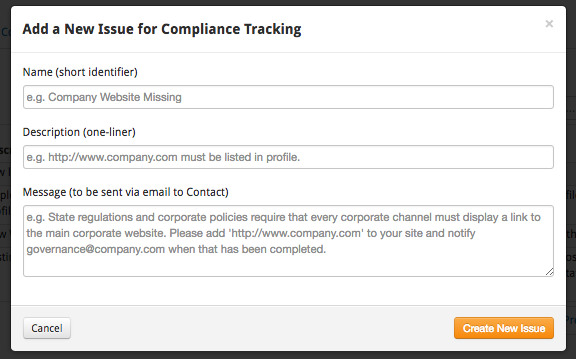
These Issues are 100% customizable by you. For each issue you want to track, you need to define the following attributes:
- Name – a short identifier used to refer to this issue
- Description – a short summary used to briefly describe the issue
- Message – the complete message fully describing the problem and remediation required.
To create Issues, go to the Issues sub-tab under the GRC tab and select Add New Issue.
When completed, all of your Issues will be listed in a table.
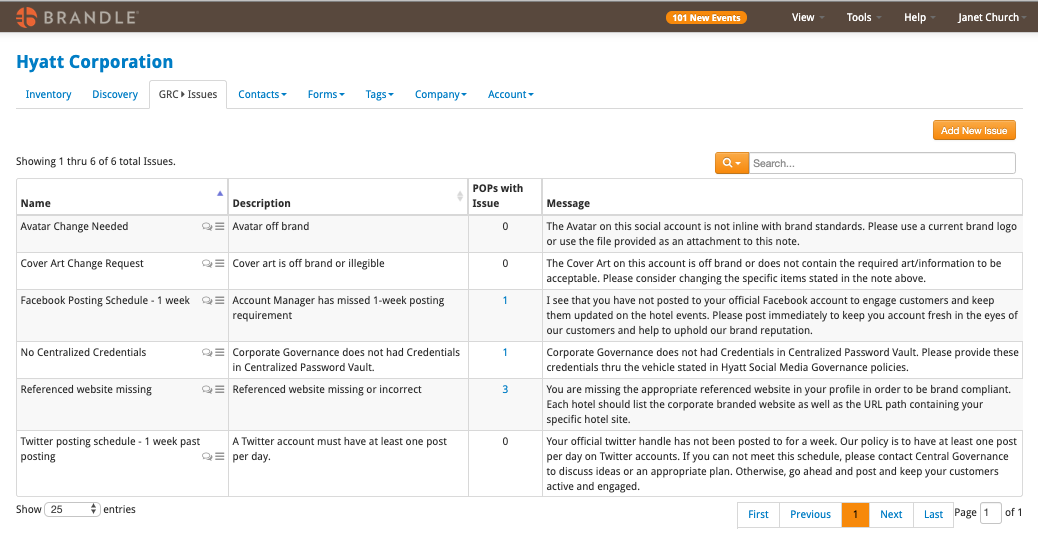
Applying Issues
After defining your Issues, you can quickly and easily apply them in the POPs View or Contacts View of the GRC tab. Just select the flag beside the POP note and you will see the list of Issues you have defined.

Review the POP, select the Issues that need addressing, and at your request Brandle will email a full compliance remediation request directly to the selected POP Contact. This will be recorded on the note (as well as any response from the POP Contact). You can also record the Issues without emailing anyone, if you are managing the compliance changes internally.
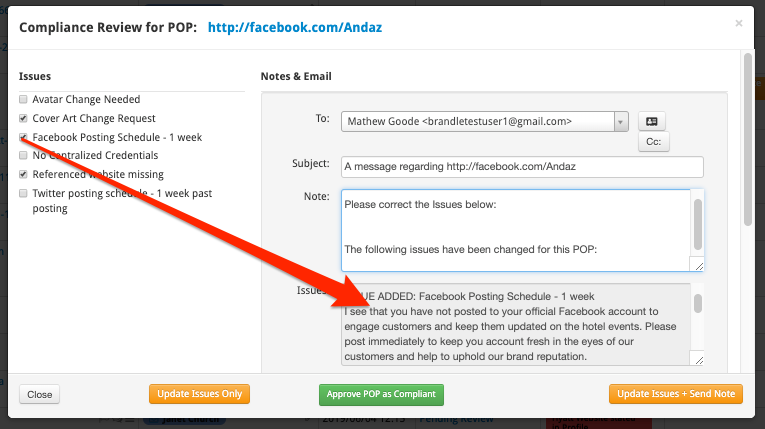
If the POP is compliant, there is no need to apply Issues and you would just use the Approve as Compliant button.
Comments
0 comments
Please sign in to leave a comment.