
The "Filter by Tags" feature allows you to search and/or filter the Inventory, Discovery and Contacts tables using Tags.
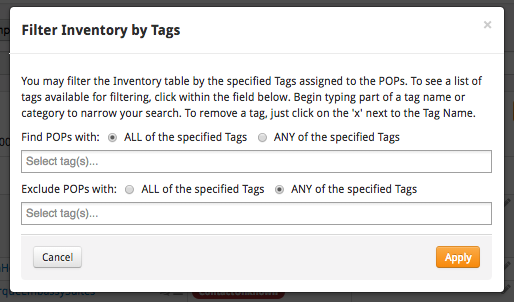
The filter presents two main options to find POPs:
- Find POPs with ALL of the specified tags
- Find POPs with ANY of the specified tags
As well as two main options to exclude POPs:
- Exclude POPs with ALL of the specified tags
- Exclude POPs with ANY of the specified tags
You can use the "ANY" option that allows you to search for (or exclude) POPs with at least one of the tags listed in the query (e.g. ANY of "A" or "B" or "C").
The "ALL" option allows you to filter down to just those POPs that have every tag listed in the query (e.g. ALL of "X" and "Y" and "Z"). For a POP to be shown, it must have all three of those tags: X, Y and Z. If a POP is missing any of those tags, it will not be displayed.
You may also want to use a Tag Tree system to filter by the Tags and views you use most often.
Comments
0 comments
Please sign in to leave a comment.