
GRC Reports are available to customers who have purchased the GRC module of the Brandle Presence Manager.
You can generate Reports by POP or by Contact. Whichever Tab you are in, you can choose to generate a report for your entire inventory, or you can apply a tag filter by clicking the Filter button.
Once filtered, the GRC table will be populated only with those Contacts and POPs that have that Tag. Now you can click the Reports button and select the type of report needed and only those POPs or Contacts in the filter will be in the report. You can also export the view to Excel.
You can produce reports using the Brandle standards reports, or you can export your current View into Excel.
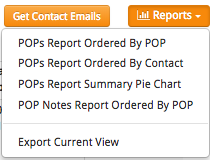
You may also find certain reports in Inventory very helpful, depending on how you have created your governance process using Tags. in the inventory Reports, there are additional options such as Tag vs. Tag reports, that might be beneficial as a compliance report.
To customize your View, select Customize View at the bottom of your View options.
Comments
0 comments
Please sign in to leave a comment.