
Sometimes it is helpful to view your discovery through the lens of how items were discovered (i.e. Discovery Sources). With the new redesign of the filter area, you can now select a Discovery Source and a general time period to review those discovered POPs matching your filter. Brandle also has color-block animation to guide you through your selection. Here are the steps:
1) Select the Source of the Discovery for the POPs you are interested in reviewing.
- From Discovery is what Brandle has found based on the algorithm that has been built for your account.
- Inventory Sweep is when Brandle has found a referenced URL on a social media POP that is not yet in your Inventory.
- From Patrols is what Brandle has discovered from your Brand Patrol identities.
- From Forms and Campaigns are submissions from specific forms or campaigns.
 2) If you select From Patrols, From Forms or From Campaigns, Brandle will guide you to select a specific item or All Patrols, All Forms, or All Campaigns.
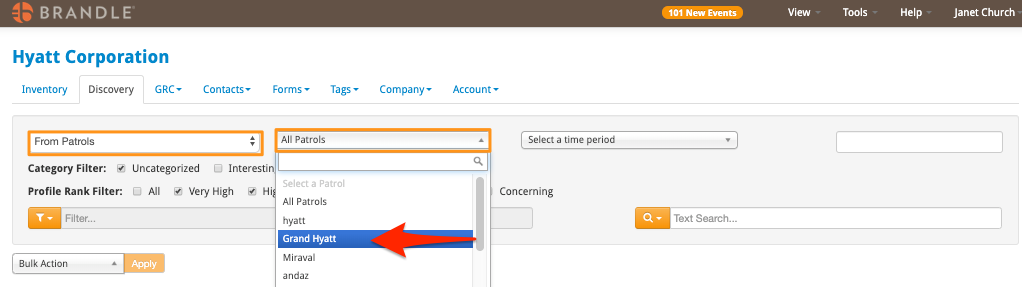
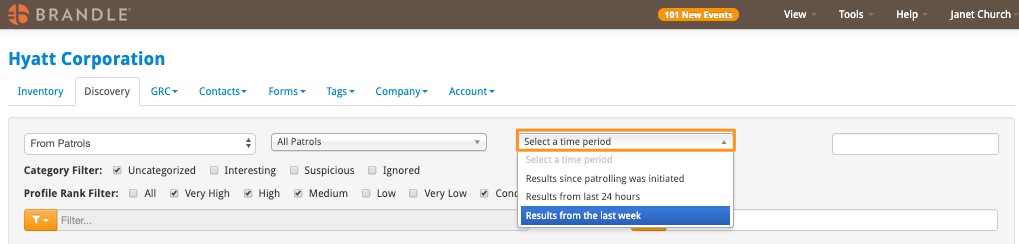
3) If you select From Patrol, the third step is to select a time period: since patrolling began, the last 24 hours, or last week. If you select From Discovery or Inventory Sweep, then Brandle will guide you to time period as the second step.
Comments
0 comments
Please sign in to leave a comment.